



 Daily Bazar
  Electronics
  Sports
  Automotive
  Stationery, Books & Music
  Lifestyle
  Fashion
 _20.jpeg) Home
Home  Garden & Pet Care
  Grocery
  Daily Bazar
  Electronics
  Sports
  Automotive
  Stationery, Books & Music
  Lifestyle
  Fashion
 _20.jpeg) Home
Home  Garden & Pet Care
  Grocery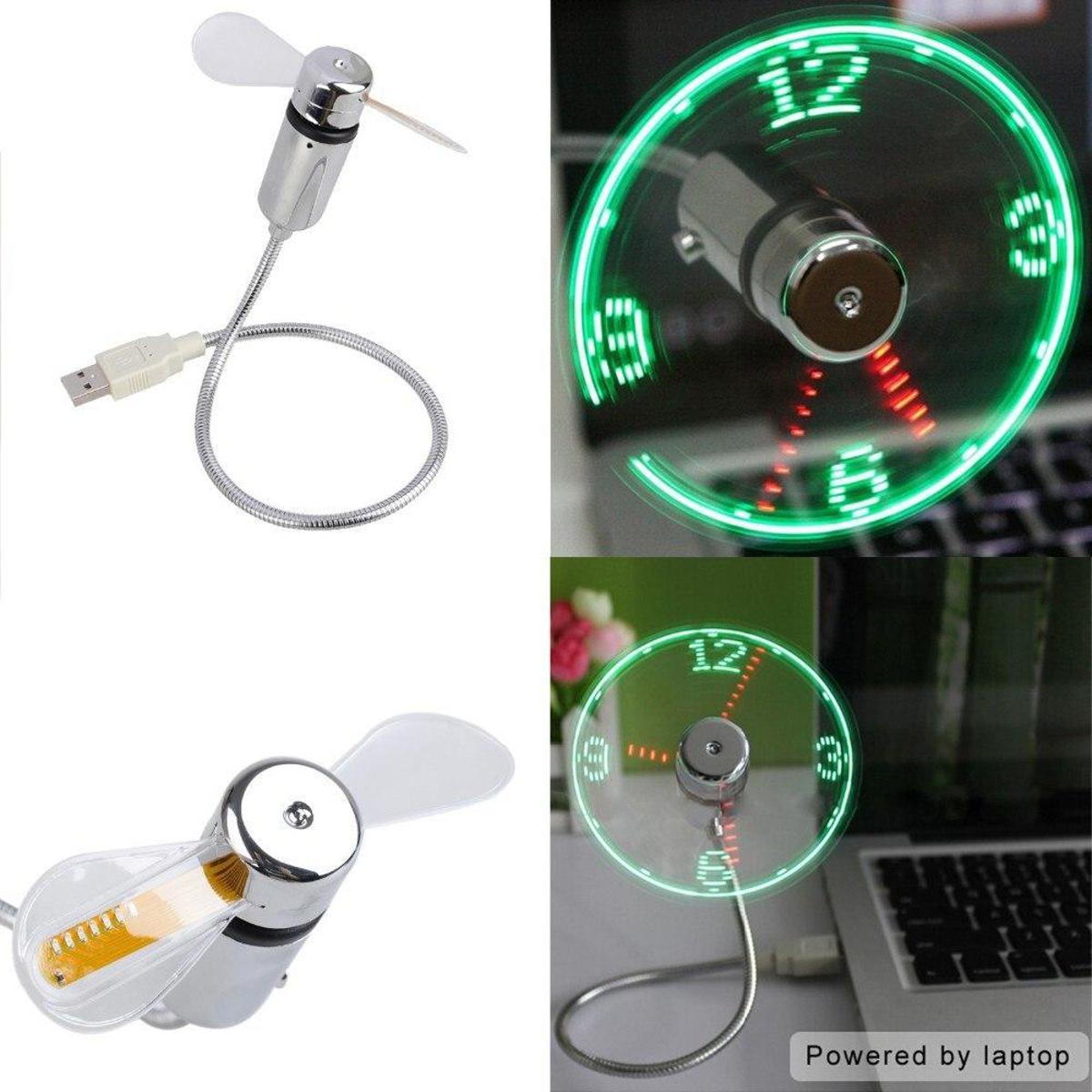
Description: • • Convenient On/Off button • Time is kept even when switched off Time Setting: • Plug into a USB port or a power bank • Press the On/Off button to turn it on • Press and hold the On/Off button until minute hand blinks • Press and hold the On/Off button to set time Kind Reminders: • Keep your hair and face away from the rotating fan blades • Be gentle and don't press hard on the USB connector when adjusting • Don't hinder the movement of the fan blades when they're rotating (it may shorten the useful life of your beloved gadget)
Setting The Time: 1. Plug into a USB port and press the ON/OFF switch to turn fan on and to activate the clock display. Please note: It can sometimes take up to 20 seconds for the LED clock to initially display. 2.Press and hold the ON/OFF button until minute hand starts blinking 3. Setting the hour hand: Continue to hold ON/OFF Button to set the hour hand. The clock will spin clockwise fast, release the button just before the correct hour. 4. Setting the minute hand: After the hour is set, the minute hand will flash. Click the ON/OFF button to move the minute hand forward to the correct time. 5. Leave for 6 seconds and the time is set.
Product length: 40 cm
Operating voltage: 5 V
Operating current: ≤350ma
Product length: 40 cm
Net weight: 54 g
Fan diameter: 88 mm
Net Weight: 78g / 2.7 oz.
How to set the time?
1. Connect the fan to the USB port and press the button to turn on the fan and activate the clock display.
2. press and hold the button until the minute hand starts to flash, then release.
3. When flashing, press and hold the button until the hands start Watch to turn and release when you reach the desired Time.
4. make small changes, click the "install" button once for each minute.
5. The time will be automatically saved after 6 seconds without activity.
6. After the first time setting, it will remain if power, no need to install again.

Login to ask a question
