


 Home Appliances
 Mobiles & Tablets
 Groceries
 TV, Audio, Gaming & Wearables
 Kitchen & Dining
 Beauty & Personal Care
 Toys & Games
 Stationery, Office & Crafts
 Pet Supplies
 Digital Goods
 Cameras & Optics
 Computers & Accessories
 Baby & Maternity
 Health & Pharmacy
 Bags & Travel
 Clothing, Shoes & Accessories
 Watches, Eyewear & Jewelry
 Automotive & Motorcycles
 Books, Music & Entertainment
 Home & Living
 Laundry & Garment Services
 Real Estate
 Sports & Outdoors
 Tools, Building & Garden
Product Details:
|
Specification |
Details |
|---|---|
|
Brand |
XparT Tools |
|
Item Code |
828360 |
|
Dimension |
3.5 × 140 mm |
|
Handle Material |
ABS |
|
Blade Material |
CR-V Steel |
|
Light Feature |
Neon Light |
|
Application |
Product Repair |
|
Folding Type |
Unfolded |
|
Recommended Age |
Adult |
|
Color |
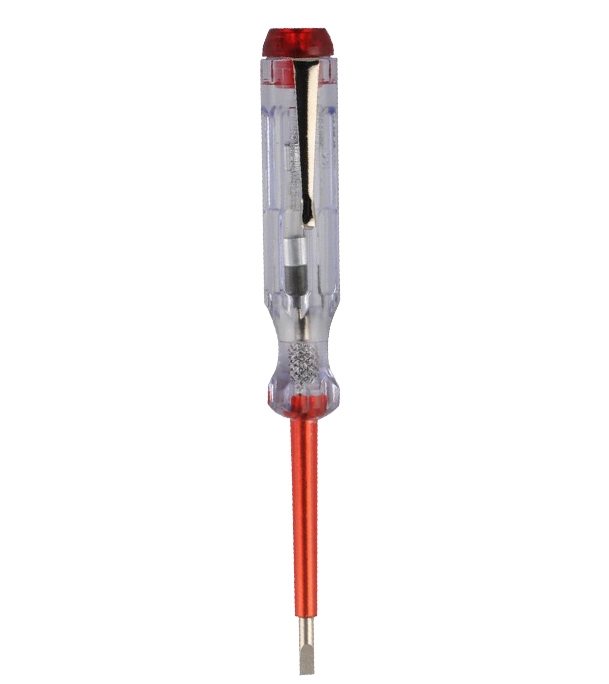
Red (As Shown in Picture) |
XparT Tools Neon Tester 3.5×140mm – Reliable Electric Voltage Testing Tool
Identify the presence of electrical voltage with the XparT Neon Tester 3.5×140mm, a practical testing tool designed for electrical inspection, product repair, and everyday maintenance tasks. Featuring a CR-V steel blade, ABS material handle, and built-in neon light indicator, this electric tester is a useful addition to any electrician's or household repair toolkit.
Whether you are handling electrical maintenance, checking wiring connections, or performing product repair work, this Neon Tester offers a convenient solution for basic voltage testing. Its compact 3.5×140mm design makes it easy to handle, carry, and store alongside other essential tools.
Durable CR-V Steel Blade
The XparT Tools electric tester features a CR-V (Chrome Vanadium) steel blade designed for strength and durability. Its sturdy construction makes it suitable for regular handling during electrical inspection and repair-related tasks. The 3.5×140mm dimensions provide a practical design for everyday testing applications.
Comfortable ABS Material Handle
Designed with an ABS material handle, this voltage tester offers a lightweight and practical grip for convenient handling. Its red-colored design makes the tool easy to recognize among other electrical tools and accessories. The handle is suitable for routine product repair and maintenance activities.
Built-in Neon Light Indicator
One of the key features of this neon tester is its built-in neon light indicator. The neon light provides a visual indication during compatible voltage-testing procedures. This makes it a useful tool for electricians, technicians, maintenance workers, and DIY users who regularly work with electrical equipment.
Practical Tool for Electrical Repair and Maintenance
The XparT Tools Neon Tester is designed for product repair and general electrical testing applications. Its compact construction and practical design make it suitable for keeping in a home toolbox, workshop, or professional tool collection.
If you are looking for an electric tester for everyday repair work, this model combines a CR-V blade, ABS handle, and neon light feature in one convenient tool.
Why Choose XparT Tools Neon Tester?
- Trusted Brand: From XparT Tools, a practical choice for everyday hardware and repair tools.
- CR-V Steel Blade: Designed for strength and durability.
- ABS Material Handle: Lightweight and convenient to handle.
- Neon Light Feature: Provides a visual indication during compatible voltage testing.
- Compact Dimensions: 3.5×140mm size for convenient handling and storage.
- Versatile Application: Suitable for product repair and electrical maintenance tasks.
- Distinctive Red Color: Easy to identify in your toolbox.
Buy XparT Tools Neon Tester in Bangladesh
Looking for a reliable neon tester price in Bangladesh? The XparT Tools Neon Tester 3.5×140mm is a practical option for electricians, technicians, repair professionals, and household users who need an everyday electrical testing tool.
At Othoba.com, explore XparT Tools and other essential hardware tools for your home, workshop, and maintenance needs. Choose this CR-V blade electric tester with an ABS handle and neon light feature for your regular repair toolkit.
Choose XparT Tools Neon Tester and keep an essential electrical testing tool within reach.
Safety Notice: Always follow proper electrical safety precautions when using this tester. Do not use it as the sole method to verify that an electrical circuit is de-energized.
Note: Product delivery duration may vary due to product availability in stock.
Disclaimer: The color of the physical product may slightly vary due to the deviation of lighting sources, photography, or your device display settings.
-
Mixed

Login to ask a question
